


User Token Information and Request
Access Tokens
The Canvas API allows programmatic access to course data, grades, and other Canvas features through custom scripts and user-built tools. To interact with the API, you need a Personal Access Token, which acts as a secure credential tied to your account.
At Cal Poly, access token creation is managed by ITS (Information Technology Services) and the CTLT (Center for Teaching, Learning & Technology) to ensure compliance with university data security policies. If your needs are related to research or program audits, you may not need a token at all—the CTLT (canvassupport@calpoly.edu) can often provide the data you need directly.
Request an Access Token
To request a Canvas Personal Access Token, do the following:
- Determine whether an access token is the right fit for your needs. If you need data for research or a program audit, contact the CTLT (canvassupport@calpoly.edu) directly to request the data.
- Submit a request through the request form. Include the a brief description of your intended use for the token. Include what data or Canvas features you plan to access and why. Requests will be reviewed for instructional necessity, accessibility compliance, and security alignment before being issued.
Common use cases include:
Instructors: Automating grade exports, building custom dashboards for student engagement data, or scripting bulk updates to course content.
Students: Pulling assignment or grade data into a personal productivity tool, or building a project that interacts with Canvas for a course assignment. Be aware that information about your token—including its stated purpose and usage patterns—may be shared with Student Rights and Responsibilities if an academic honesty complaint is filed against you.NOTE: You can view and manage assignment information on the Canvas Edit Assignment Dates page. All graded items in your course, including assignments, discussions, and quizzes, are listed in the Title column [1]. Current assignment due dates and times (if any) display in the Due At column [2], and current availability dates (if any) display in the Available From and Available Until columns [3]. Canvas has built-in tools to allow faculty to adjust due dates for all activities
You can also view and edit differentiated due dates for students, sections, and groups [4].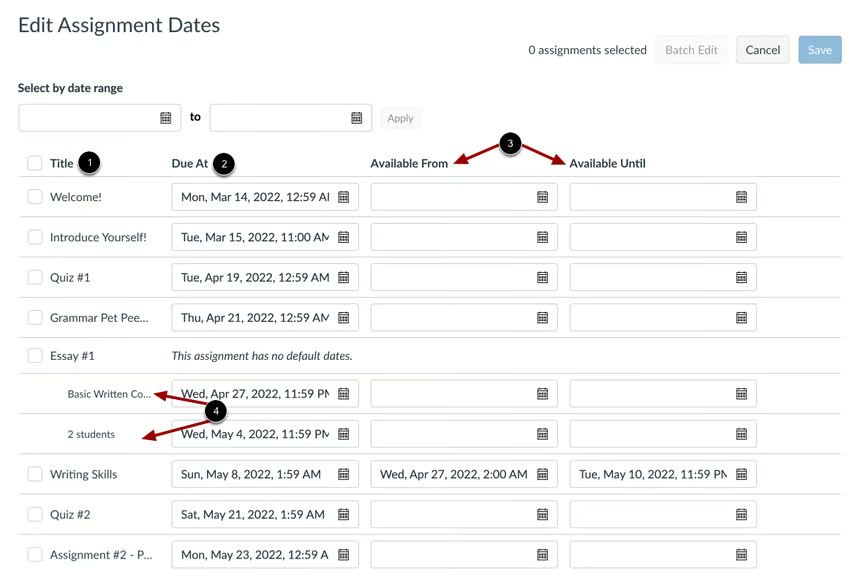
The Canvas Multi-Tool (part of the DesignPLUS suite by CIDI Labs) helps instructors quickly build and manage course content. It consists of three main utilities: the Template Creator to design customizable page templates, the Module Builder to instantly generate course frameworks, and the Due Date Modifier to adjust all assignment deadlines on a single page.
- Cal Poly Canvas Support will coordinate with the Information Security team to evaluate your use case. You may be contacted for additional details during this review.
- If your request is approved, the Cal Poly Canvas Support team will generate a Personal Access Token on your behalf and provide it to you securely (OneDrive).
- The OneDrive share will be automatically deleted in 2 weeks. We highly recommend storing it in a secure location, such as a password manager. Cal Poly provides LastPass to faculty and students.
Please fill out the request form.
Once the form is submitted, it can take Cal Poly Canvas support up to 78 hrs (M-F).
Additional Considerations
- Token expiration and renewal: Tokens are issued with a 90-day expiration date. Canvas Support does not issue tokens with unbounded end dates. When your token is approaching expiration, contact the Cal Poly Canvas Support Team to request a renewal via this form.
- Usage auditing: All token usage is regularly audited to ensure it remains consistent with the stated purpose.
- Account compromise: If your Cal Poly account is reported as compromised, all active sessions—including API tokens—are deleted as a security measure. Contact the Cal Poly Canvas Support Team to request a new token once your account has been secured.
- Request denied: Review the feedback provided by ITS and the Information Security team. Revise your use case and resubmit if appropriate.


